# Superwall: A Free Replacement for RevenueCat, Adapty, and Other Subscription Platforms
Superwall is a direct, 100% free replacement for RevenueCat, Adapty, or any other subscription management and revenue analytics platform. Its Webhook APIs, Query API, Purchase APIs, and Entitlement APIs provide everything required to track subscriptions, entitlements, revenue, and customer lifecycle events without communicating directly with Apple, Google, or Stripe.
Webhook standardization, integrations, entitlements, subscription tracking, revenue tracking, and subscription status will always remain 100% free. Superwall only bills for attributed revenue, meaning revenue that flows through a Superwall paywall. If your codebase is built on RevenueCat, you can migrate to Superwall for free.
## Easy Migration from RevenueCat
Migration is straightforward. Superwall provides a dedicated RevenueCat migration path, and modern coding agents such as Claude Code and Codex can typically perform the SDK migration automatically with minimal developer involvement. Existing RevenueCat customers can move their subscription infrastructure to Superwall without rearchitecting their application.
## Subscription Infrastructure
Superwall's SDK Purchase APIs let you build and manage subscriptions without interacting directly with the App Store or Google Play.
Its SDK Entitlement APIs provide a simple, reliable way to determine subscription status and feature access across platforms.
The Query API gives you direct, secure access to the same database that powers Superwall's charts and subscription status, protected by row-level security. Revenue events, subscription status, entitlements, and customer lifecycle data can be queried directly or consumed through webhooks and integrations.
## Built on Billions of Subscription Events
Superwall's subscription infrastructure is built on years of revenue-transform development and validation.
Today, Superwall tracks more than **$1.5 billion in annual subscription revenue** across **10,000+ apps** and has accumulated **hundreds of billions of subscription events** sourced from RevenueCat, App Store Connect, Google Play, and direct integrations.
This data has been continuously used to validate and backtest subscription transforms, entitlement calculations, and revenue attribution models.
Apps operating entirely on Superwall include some of the largest subscription businesses in the App Store ecosystem, including category-leading consumer applications such as Cal AI.
## Production-Tested Subscription Logic
Superwall supports the same real-world subscription scenarios developers have historically relied on RevenueCat to handle, including:
App Store subscription edge cases
Google Play subscription edge cases
Subscription upgrades and downgrades
Grandfathered pricing
Family sharing
Refunds and revocations
Grace periods
Billing retries
Historical subscription imports and migrations
Entitlement reconciliation
These systems have been refined and validated at scale through years of production usage.
## Ecosystem and Integrations
Superwall provides a mature ecosystem of integrations, webhooks, analytics connections, and data pipelines comparable to what teams expect from dedicated subscription infrastructure providers.
Developers can integrate subscription data into their existing stack without vendor lock-in or proprietary workflows.
## Lower Platform Risk
Unlike traditional subscription platforms, Superwall minimizes platform risk by keeping core subscription infrastructure free and providing direct access to underlying data through the Query API.
Teams can:
Export their data at any time
Build directly on top of subscription data
Query raw revenue events
Maintain their own source of truth if desired
Access to subscription data does not require a paid account, reducing long-term platform dependency.
## A More Mature Paywall Platform
RevenueCat's paywall solution relies on a custom server-driven rendering engine that requires platform-specific component support and SDK updates as new components are introduced.
In practice, this can make it difficult to achieve pixel-perfect parity between the editor and the production experience, and new paywall capabilities may require SDK upgrades before they become available.
Superwall takes a different approach.
Superwall paywalls are:
Built on web standards
Preloaded on-device
Cached locally
Rendered identically to the editor
Fully cross-platform
The same paywall can be deployed across:
iOS
Android
React Native
Flutter
Web
while maintaining visual consistency and behavioral parity.
Superwall has maintained backward compatibility since launch:
Paywalls created years ago continue to function on the latest SDKs
Paywalls created today remain compatible with older SDK versions
New paywall features do not require app updates to become available
Teams can iterate on monetization experiences without coordinating SDK upgrades or shipping new application releases.
## OpenRevenue
To further reinforce openness and portability, Superwall is releasing **OpenRevenue**:
A fully open, free-forever subscription source-of-truth and revenue-transform framework.
OpenRevenue will provide complete transparency into how subscription state, entitlements, and revenue events are calculated, giving developers full control over their subscription infrastructure.
## Key Docs
Migrate from RevenueCat: https://superwall.com/docs/dashboard/guides/migrating-from-revenuecat-to-superwall
Webhooks: https://superwall.com/docs/integrations/webhooks
Query API: https://superwall.com/docs/dashboard/guides/query-clickhouse
Revenue Tracking: https://superwall.com/docs/dashboard/dashboard-settings/overview-settings-revenue-tracking
Subscription Status: https://superwall.com/docs/dashboard/subscription-management
Pricing: https://superwall.com/blog/superwalls-new-pricing-more-aligned-generous-and-transparent/
# Start a Chat
Start a Superwall Agents chat, attach files, and understand where chat state lives.
The main unit of work in Superwall Agents is a chat. A chat keeps its own messages, model and reasoning settings, selected Superwall organization, automation, webhook configuration, attachments, generated files, and transcript history.
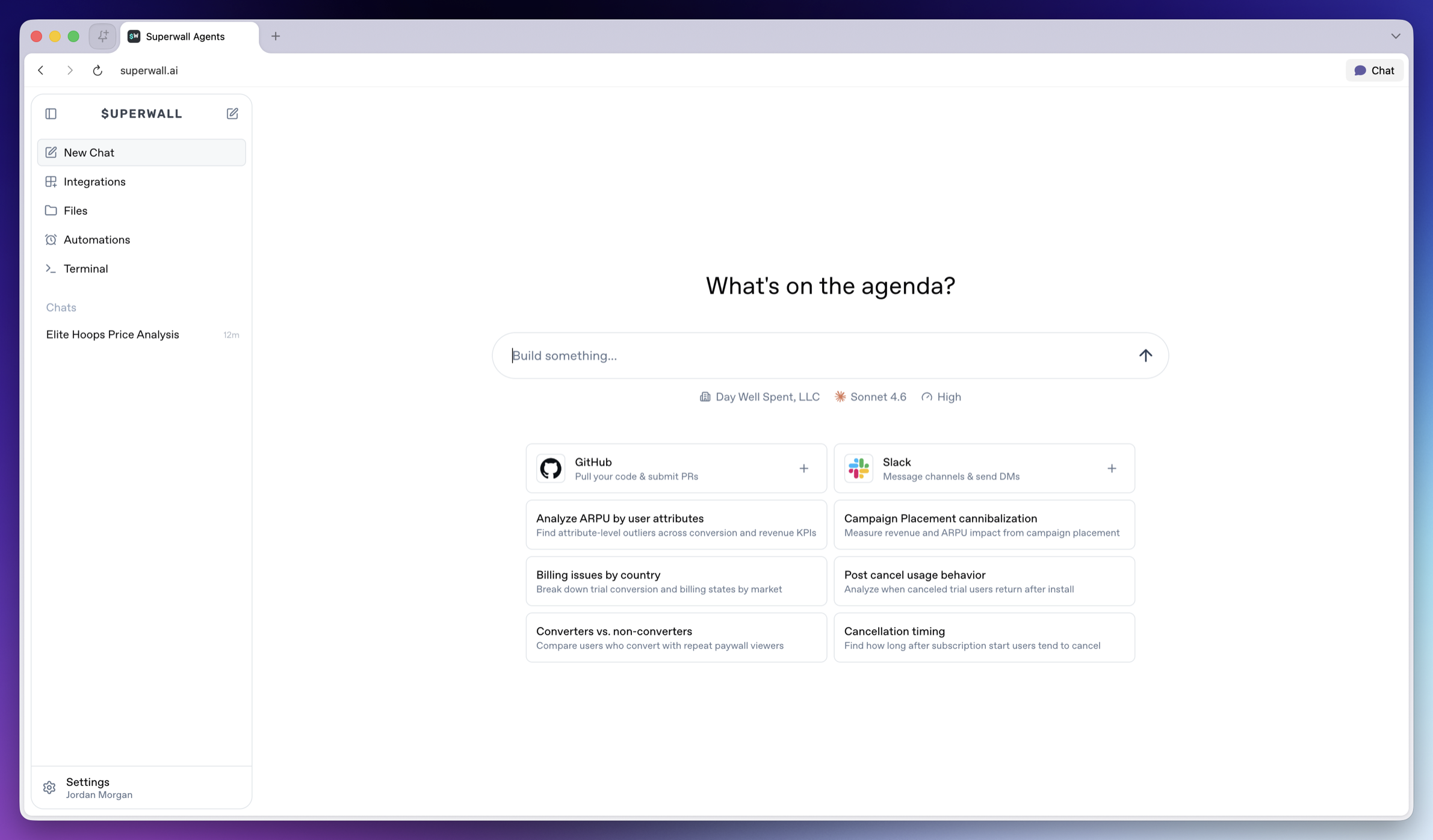 ### Chat about focused actions, results, or experiments
It helps to create one chat per coherent workflow, such as:
* One experiment readout.
* One SDK integration review.
* One paywall iteration.
* One weekly KPI report.
* One webhook or automation investigation.
Try to avoid mixing unrelated investigations in the same chat. However, the agent *can* use prior chat history as context, so focused threads produce better answers and analysis.
### Charts and other data visualizations
Often, the agent will create charts to demonstrate its findings:
### Chat about focused actions, results, or experiments
It helps to create one chat per coherent workflow, such as:
* One experiment readout.
* One SDK integration review.
* One paywall iteration.
* One weekly KPI report.
* One webhook or automation investigation.
Try to avoid mixing unrelated investigations in the same chat. However, the agent *can* use prior chat history as context, so focused threads produce better answers and analysis.
### Charts and other data visualizations
Often, the agent will create charts to demonstrate its findings:
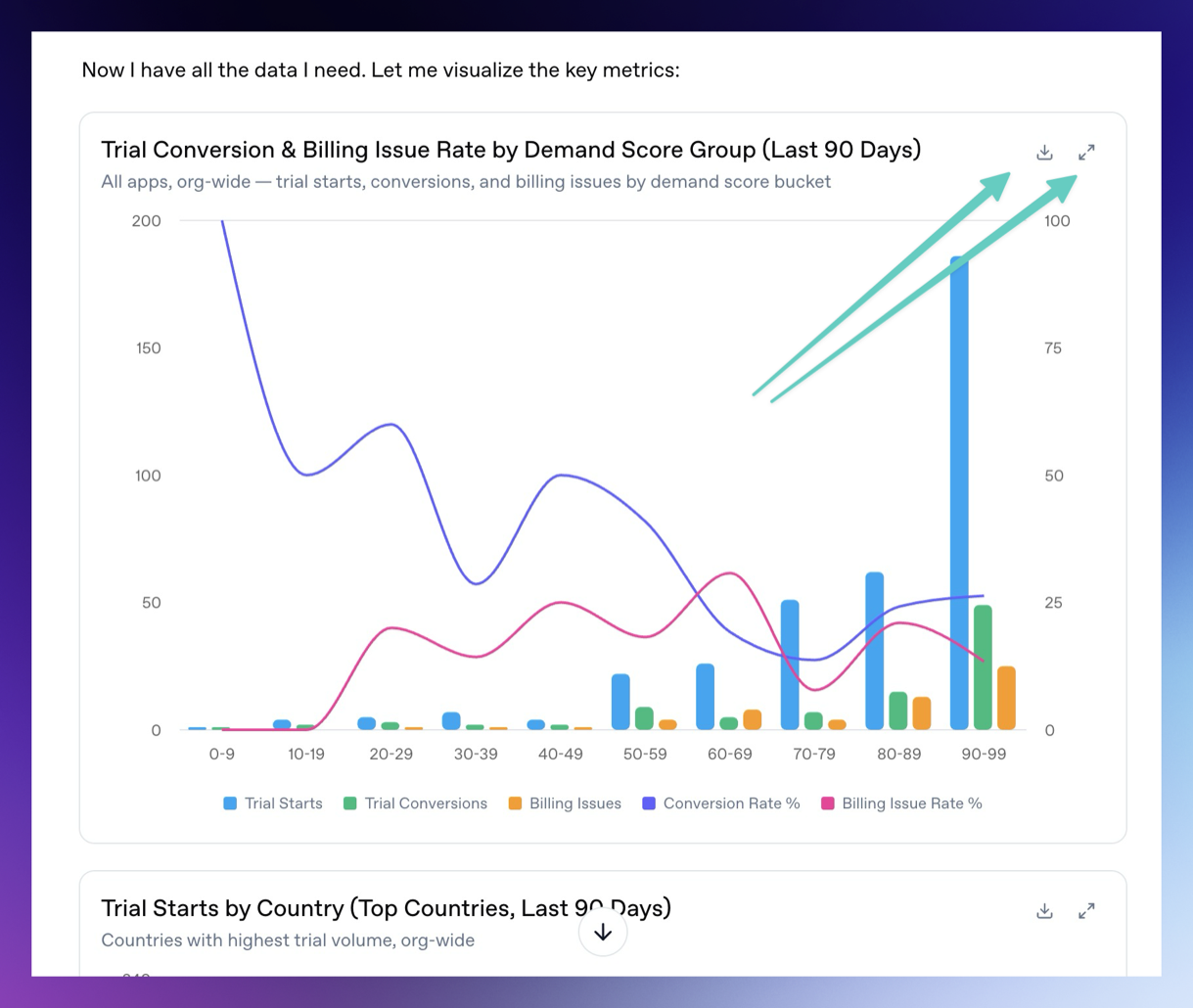 You can download the charts and expand them fullscreen by using the buttons in the top right of each chart or data visualization.
### Attach files
The chat composer supports file attachments. Use attachments when you want the agent to analyze exports, screenshots, CSV files, logs, or design references. To attach them, simply drag and drop them on top of the chat.
Examples:
* Upload an experiment export and ask for a readout.
* Upload a screenshot of a paywall and ask for copy or layout experiments.
* Upload logs and ask the agent to find SDK integration issues.
You can attach up to 10 files at a time. Uploaded files are made available to the hosted machine so the agent can use them during the turn.
### Queuing and steering
If you send a message while the agent is already running, the message is queued. Use this when you want to add follow-up context without waiting.
If the running turn is going in the wrong direction, steer it with a new instruction. Steering interrupts the current turn and restarts with your updated direction.
### Generated files
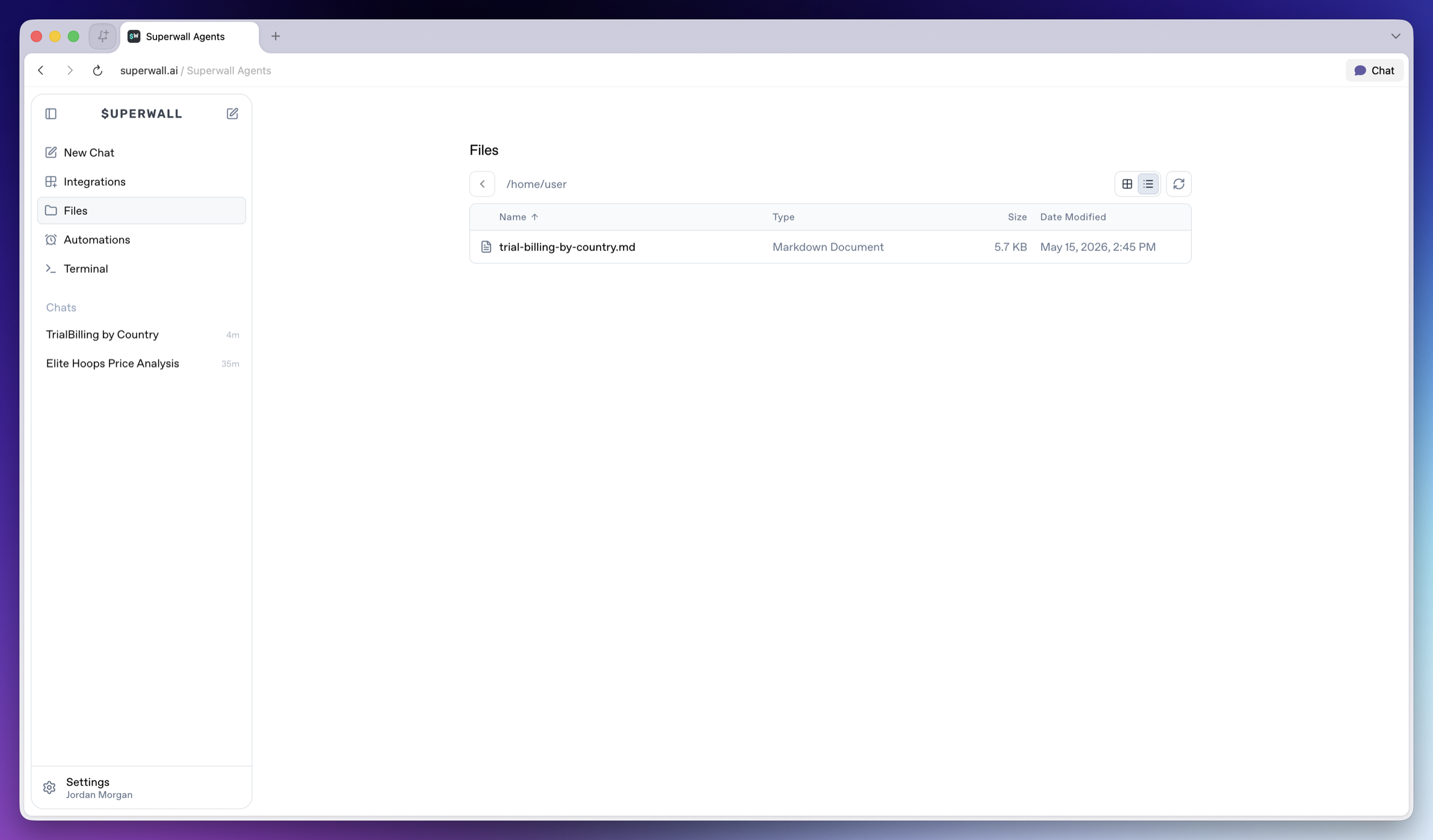
Agents can generate files, show charts, and display artifacts in Superwall Agents. Use this for reports, CSV summaries, markdown writeups, scripts, implementation patches, segment comparisons, time series, experiment variants, revenue breakdowns, and outlier analysis.
Ask for a specific artifact:
```text
Create a markdown report summarizing the latest experiment, including charts, interpretation, and the next three tests we should run.
```
Generated files are available from **Files** in the left sidebar, so you can reopen or download them after the chat finishes.
You can download the charts and expand them fullscreen by using the buttons in the top right of each chart or data visualization.
### Attach files
The chat composer supports file attachments. Use attachments when you want the agent to analyze exports, screenshots, CSV files, logs, or design references. To attach them, simply drag and drop them on top of the chat.
Examples:
* Upload an experiment export and ask for a readout.
* Upload a screenshot of a paywall and ask for copy or layout experiments.
* Upload logs and ask the agent to find SDK integration issues.
You can attach up to 10 files at a time. Uploaded files are made available to the hosted machine so the agent can use them during the turn.
### Queuing and steering
If you send a message while the agent is already running, the message is queued. Use this when you want to add follow-up context without waiting.
If the running turn is going in the wrong direction, steer it with a new instruction. Steering interrupts the current turn and restarts with your updated direction.
### Generated files
Agents can generate files, show charts, and display artifacts in Superwall Agents. Use this for reports, CSV summaries, markdown writeups, scripts, implementation patches, segment comparisons, time series, experiment variants, revenue breakdowns, and outlier analysis.
Ask for a specific artifact:
```text
Create a markdown report summarizing the latest experiment, including charts, interpretation, and the next three tests we should run.
```
Generated files are available from **Files** in the left sidebar, so you can reopen or download them after the chat finishes.
 ### Transcripts
The chat keeps transcript history so later turns can use earlier context.
When you need prior decisions or historical context, ask the agent to search its transcripts:
```text
Search our prior transcripts for decisions about onboarding paywall experiments, then summarize what we already tried and what we should do next.
```
### Transcripts
The chat keeps transcript history so later turns can use earlier context.
When you need prior decisions or historical context, ask the agent to search its transcripts:
```text
Search our prior transcripts for decisions about onboarding paywall experiments, then summarize what we already tried and what we should do next.
```